Context Engineering for Agents: Three Levels of Disclosure
Main takeaway
Sharing a few tips from implementing a tool-heavy agent that operates on a lot of data using Claude Agent SDK:
- shield the primary agent using both client-side filtering and server-side context editing (Anthropic’s
context_management). - design for three levels of disclosure, from least to most: 1) the primary agent, 2) user, 3) logs. Managing all three are important to allow for efficiency (agent), transparency (user), and faster iteration cycles (logs).
- use the token count API to estimate the # of tokens that would be sent to the primary agent. Print out the progress bar as you iterate, and it doubles as visual feedback to the user on how much context they’ve used.
Motivation
I’ve been exploring context rot in prior posts—from Reasoning Banks to Recursive Language Models to RLM + Code Execution. Those experiments used research datasets like BrowseComp Plus where I could control context growth.
Production is different. First, a shoutout to Claude Haiku (and yes of course Opus 4.5 is incredible). For low latency use cases where users are iterating in the flow, I’ve found Haiku 4.5 to be quite amazing at tool calling, code execution, and understanding structured data like spreadsheets. Haiku “only” has 200K tokens, and I’ve found that single tool calls like web search or complex chart generation could cause ERROR: prompt is too long: 208991 tokens > 200000 maximum.
Managing Context
The goal is to ensure the primary agent only remembers what would be helpful to reason about the next step. Aggressive filtering is key here. It’s also important to remember that there are two important other parties in the system:
- the user wants transparency on what’s being done, and also see outputs like charts or forecasts
- logs are also critical as you iterate on adding more tools and expanding the use case. This is especially true when asking the primary agent to leverage code execution to chain multiple tool calls. Reviewing the logs of errors is key to refining the sandbox env, tool descriptions, and system prompt.
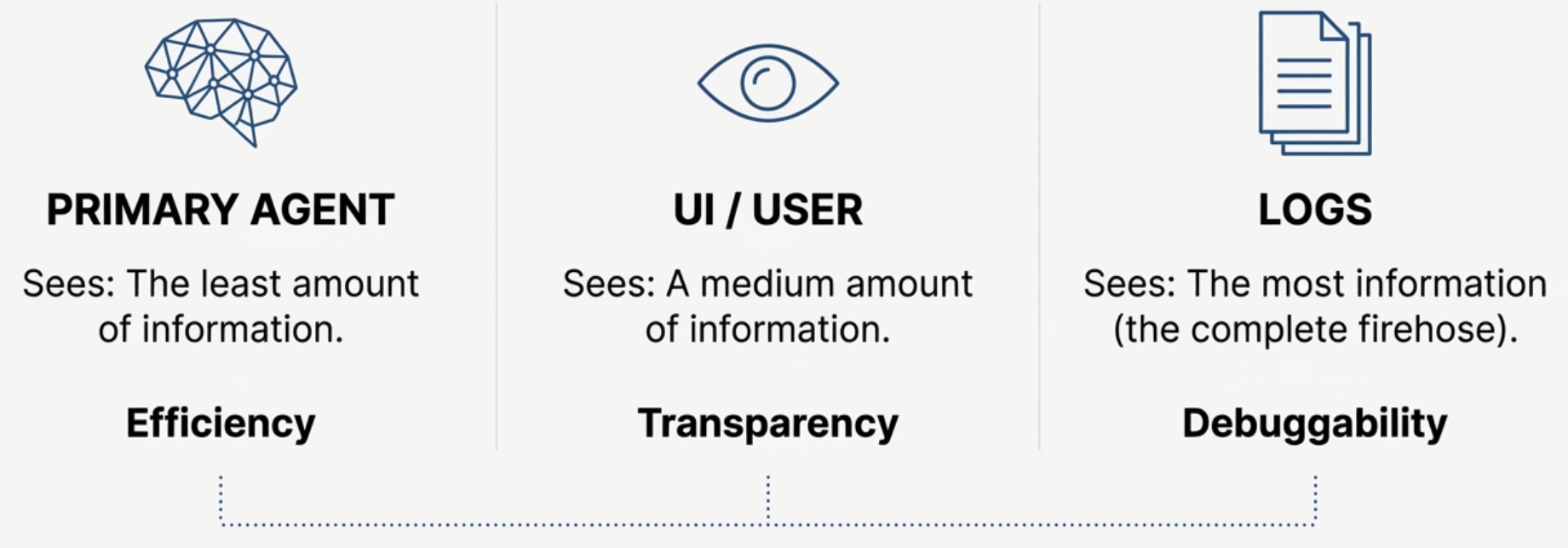
Shielding the Primary Agent
Layer 1: Server-Side Context Management
Anthropic provides an API for automatic cleanup: the context_management parameter (beta). This clears old tool calls when context goes over a certain limit.
async with client.beta.messages.stream(
    model=config["model"],
    max_tokens=config["max_tokens"],
    system=config["system"],
    tools=tools,
    messages=messages,
    betas=["context-management-2025-06-27"],
    context_management={
        "edits": [
            {
                "type": "clear_tool_uses_20250919",
                # Trigger at ~50% capacity to leave headroom
                "trigger": {"type": "input_tokens", "value": 100000},
                "keep": {"type": "tool_uses", "value": 2},
                "clear_at_least": {"type": "input_tokens", "value": 15000},
            }
        ]
    }
) as stream:
I’m triggering at ~50% of capacity here to leave headroom. If your tools can return very large payloads in a single turn (e.g., 100K+ tokens of web search results), you may want to trigger earlier.
When the trigger fires, old tool results are replaced with a placeholder:
[Tool result cleared to manage context length]
Claude understands this. If it needs that data again, it can re-call the tool.
Layer 2: Client-Side Filtering
Server-side clearing only helps if your request is already under 200K tokens. For tools that produce massive output, you need client-side filtering before adding to conversation history. You could also enable client-side Compaction, which summarizes and replaces the conversation history. That’s super useful as a coarse control that’s intentionally lossy, and operates at session level. For tools that have known large results, I’d prefer to apply the methods below:
| Scenario | Approach | When to Use | Example |
|---|---|---|---|
| Web search returns 100K+ tokens | Sub-agent summarization | Content has semantic meaning agent needs to reason about | Spawn sub-agent to synthesize into 2-3 sentences |
| Chart generation outputs base64 | Simple filtering | Content is binary/visual; agent just needs confirmation | Replace with [CHART_GENERATED] |
| Code writes CSV to disk | Pointer storage | Content is regenerable; agent can reload on demand | Store file_id only, fetch if needed |
Web search
For web search, I use another LLM with isolated context to compress 100K+ tokens down to 2-3 sentences. This pattern is described in detailed in my Recursive Language Model post.
async def execute_web_research(query: str) -> dict:
    # spawn separate llm call (isolated context)
    response = await client.messages.create(
        model="claude-haiku-4-5",
        max_tokens=2000,  # can force compact output
        system="Synthesize web search results into 300-500 words", # replace with your synthesis prompt
        tools=[WEB_SEARCH_TOOL],
        messages=[{"role": "user", "content": query}],
    )
    return {"summary": extract_text(response), "sources": urls}
Visualizations
For charts generated from code execution, the three levels of disclosure work like this: the sandbox saves the PNG to a temp file and returns base64. The UI streams the full image to the user. The agent only sees [CHART_GENERATED]. The logs capture the full payload for debugging.
def _filter_tool_result_for_history(tool_name: str, result: dict) -> dict:
    if tool_name == 'execute_code' and result.get('success'):
        return {
            'success': True,
            'output': {'chart': '[CHART_GENERATED]'},
            # Omit: stdout, stderr, base64 – these go to UI/logs, not the agent’s context
        }
I actually hit a tricky bug on this. I had this filtering but still hit overflow after chart generation. Turns out the sandbox printed the entire output dict (including base64) to stdout for IPC—so there were two copies of the chart data. Make sure to remove stdout from agent context entirely (307KB → 59 bytes). Stdout still goes to logs.
Tip: Token Observability
Tracking tokens in memory is critical to optimizing the overall agent. Two ways to track it:
| Method | When to Use |
|---|---|
client.messages.count_tokens() | Before API call |
response.usage.input_tokens | After API call |
The Token Counting API mentioned that its an estimate, but I’ve found it to be very accurate. The pre-flight counting detects overflow before it happens:
token_count = await client.messages.count_tokens(
    model=model, system=system, tools=tools, messages=messages
)
usage_pct = token_count.input_tokens / 200000
warning = "critical" if usage_pct >= 0.9 else "warning" if usage_pct >= 0.75 else "normal"
Results
Here’s a realistic scenario: the user asks
“Analyze this dataset, search for relevant supporting evidence online, formulate predictions and forecasts, summarize key insights, and create visualizations.”
TOOL SEQUENCE & TOKEN USAGE (CLAUDE HAIKU 4.5 – 200K LIMIT)
───────────────────────────────────────────────────────────────────────────────────────────────
STEP / TOOL                 WITHOUT FILTERING                               WITH FILTERING
                            tokens / 200K  (%)  [progress]                  tokens / 200K  (%)  [progress]
───────────────────────────────────────────────────────────────────────────────────────────────

1. Input query              2K / 200K  (1%)   [░░░░░░░░░░░░░░░░░░░░]       2K / 200K  (1%)   [░░░░░░░░░░░░░░░░░░░░]
   "Analyze this            (initial user message)                         (same)
   dataset...

2. read_files               12K / 200K (6%)   [█░░░░░░░░░░░░░░░░░░░░]      12K / 200K (6%)   [█░░░░░░░░░░░░░░░░░░░░]
   (raw data)               (500 rows × 20 cols inline)                    (same data)
   ↳ 500 rows × 20 cols

3. web_search               107K / 200K (54%)[███████████░░░░░░░░░]        16K / 200K (8%)   [██░░░░░░░░░░░░░░░░░░]
   (background refs)        (15 results, full content in context)          (sub-agent summary only, ~2K)
   ↳ 15 results

4. code_analysis            115K / 200K (58%)[████████████░░░░░░░░]        24K / 200K (12%)  [███░░░░░░░░░░░░░░░░░]
   (metrics & stats)        (Python code + long explanation inline)        (more compact reasoning)
   ↳ Python + explainer

5. write_csv                145K / 200K (73%)[███████████████░░░░░]        25K / 200K (13%)  [███░░░░░░░░░░░░░░░░░]
   (aggregated table)       (5K-row CSV stored inline in messages)         (file pointer only; no inline CSV)
   ↳ 5K-row CSV

6. chart_generation         235K / 200K (118%)[████████████████████] ✗     25K / 200K (13%)  [███░░░░░░░░░░░░░░░░░]
   (3 charts)               (3× base64 PNG blobs in context)               (UI gets PNG; agent sees
   ↳ 3× base64 PNG                                                          "[CHART_GENERATED]" stub)

7. Agent summary            — (not reached; overflow at step 6)            26K / 200K (13%)  [███░░░░░░░░░░░░░░░░░] ✓
   "I’ve analyzed your                                                   (final natural-language summary +
   data, here are the                                                    references to charts/table
   key insights and charts…"

───────────────────────────────────────────────────────────────────────────────────────────────
Context limit (Claude Haiku 4.5): 200K tokens

End-to-end latency        ~2–3 minutes (retries on overflow)              ~35 seconds (no retries)
In this trace, filtering reduced peak context from ~235K to ~26K tokens, an ~89% reduction.
Key Takeaways
Protect the primary agent by thinking through context on three levels of: agent, user, logs.
- Use token count API to visualize exactly how much context is in memory.
- Be clear on where you are sending stdout from the code execution sandbox.
- Leverage Sub-LMs to summarize large tool results
- Apply client and server side filtering.
References
- Anthropic: Context Windows
- Anthropic: Context Editing
- Anthropic: Effective Context Engineering for AI Agents
- Chroma Research: Context Rot
Views are strictly my own.
Published: December 8, 2025
Enjoy Reading This Article?
Here are some more articles you might like to read next: